


Export wizard: Column filter
On the help page 'Content', we described how to edit the properties of your export columns in the last step.
The following function deserves special attention:
Column filter
When editing any column, you can define filters to remove irrelevant data from the export depending on the column value.
The function is similar to hiding rows with "AutoFilter" in Microsoft Excel® and similar software.
This often lets you make the export file considerably smaller and "tighten" its content, which simplifies further processing.
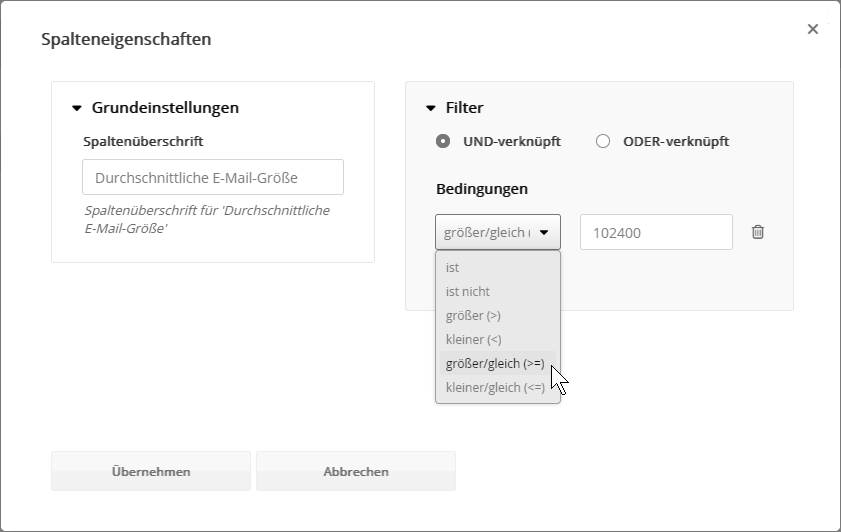
Since you can use any number of filters, all of the following examples can be combined with each other, e.g. export only the statistics of mails of the type "campaign mail" with a send start from 2024 onward and at least 10 opens in the period under review.
Examples for the export type 'Mailing statistics', filtering by mailing details or event details:
- Mailing details: Export only the statistics of oversized mailings, e.g. 'Average email size >=102400'
(entered in bytes; the example corresponds to 100 kB x 1024). - Mailing details: Export only the statistics of mailings to specific subscriber lists or target groups, e.g. 'Subscriber list is Visitors' or 'Target group is New customers'.
- Mailing details: Export only the statistics of campaign mails -> 'Mailing type is campaign'.
- Mailing details: Export only the statistics of mailings of a specific category, e.g. 'Group for system statistics is Visitors'
- Mailing details: Export only the statistics of more recent mailings, e.g. 'Send start is after 01.01.2025'
- Event detail: Export only the statistics of mailings that had sendings or deliveries in the period under review -> 'Sent total >0' or 'Traffic >0' or 'Deliveries >0'
- Event detail: Export only the statistics of mailings that had reactions in the period under review -> 'Opens total >0' or 'Clicks total >0'
Examples for the export type 'Response data', filtering by event details, mailing details or subscriber fields:
- Event details for clicks: Export only clicks on a specific topic across all newsletters, e.g. 'Link comment is Ticket shop' or 'Link interest is Holiday home or Holiday apartment'.
- Event details for opt-outs: Export only opt-outs from specific lists, e.g. 'Opt-out list name is Visitors'.
- Mailing details: Export only events of mailings to specific subscriber lists or target groups, e.g. 'Subscriber list is Visitors' or 'Target group is New customers'.
- Mailing details: Export only events of campaign mails -> 'Mailing type is campaign'.
- Mailing details: Export only events of mailings of a specific category, e.g. 'Group for system statistics is Visitors'
- Subscriber fields: Export only events with existing subscriber data, i.e. leave out deleted, unsubscribed and "profiling-less" subscribers, e.g. 'Email is not empty or Last name is not empty'
- Subscriber fields: Export only events of specific subscribers, e.g. 'Multiple selection is Option A or Option B'.