


Subscribers: Interests
Our interests module supports sending personalized content based on an automatically generated interest profile.
Every click counts and continuously sharpens the profile of your subscribers. The reward is much simpler Target groups and the automatic sorting of articles in the newsletter of each subscriber.
How it works: an overview
With these three steps, your subscribers will collect interest points from now on:
- Create an interest: Create one or more new interests.
- Link mailing links: Assign the matching interests to the links in your mailing.
- Collect clicks: Send your mailing.
With every click on an interest link, the subscriber collects interest points. After you have sent a few mailings, you can use the resulting interest profile. This includes interest-based target groups, the interest-based sorting of articles in the newsletter and the statistical evaluation.
Note: Enriching interests requires the subscriber's profiling consent.
Creating interests
Create a few interests for which you want to record your subscribers' clicks from now on.

Basic settings
Enter the name of the interest and, optionally, a description.
Advanced settings
You can define further properties for each interest.
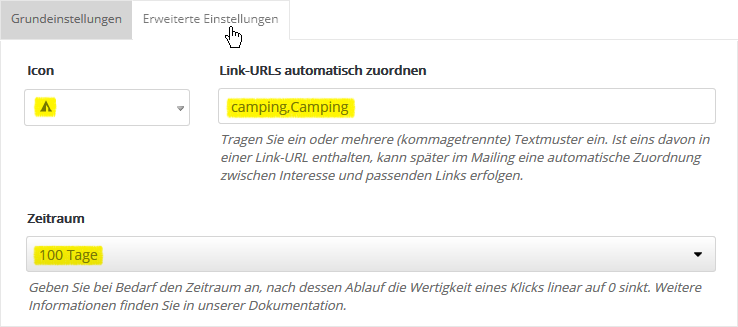
Icon
If an icon is selected, it is shown in addition to the name of the interest on the Interests tab of the statistics.
Assign link URLs automatically
Enter a text pattern for your link URLs. This enables the automatic link assignment between link URL and interest in your mailings. In the example above, all links whose link URL contains the string "camping" or "Camping" are automatically assigned the interest "Camping". You can enter several text patterns separated by commas. The search is case-sensitive.
Expiration period
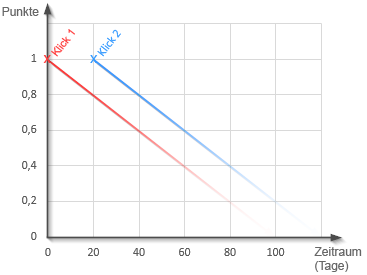
Interests can change over time. This is why it makes sense to weight newer clicks higher than older ones. In the 'Expiration period' field, enter how quickly the value of an old click should drop toward 0.
The following example shows how several clicks increase the interest and how emma calculates the current point value.
|
|
|
Day 0: The subscriber clicks the camping link. Their camping interest is now 1 point. Day 20: Click 1 was 20 days ago. Its value has dropped to 0.8. If the subscriber clicks a camping link again, a "fresh" point is added. Their camping interest is now 1.8 points.
|
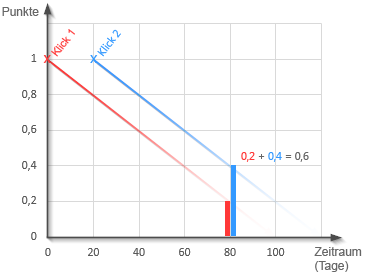
Meanwhile, 80 days have passed. You want to send a new mailing and have various interest articles sorted automatically for it.
|
|
|
Day 80: Click 1 now has hardly any effect; its value has dropped to 0.2. Click 2 was also 60 days ago; its value is now 0.4. Added together, this gives the current camping interest of 0.6.
Conclusion: The subscriber may now have other interests with higher values. In that case, the camping article will appear further down in the mailing. Or it may be left out completely if a maximum number of interest articles is programmed in the template. |
The period for the declining interest can be set from 1 to 2000 days. The default setting is 365 days. If you have selected the option "-", interest points never expire, i.e. every click, no matter how old, counts 100% in the calculation.