de en


Subscribers: Export

You can export subscriber lists from emma as CSV files. This lets you create local backups of your subscriber lists, or edit their content and then import it again using the import type 'Update'.


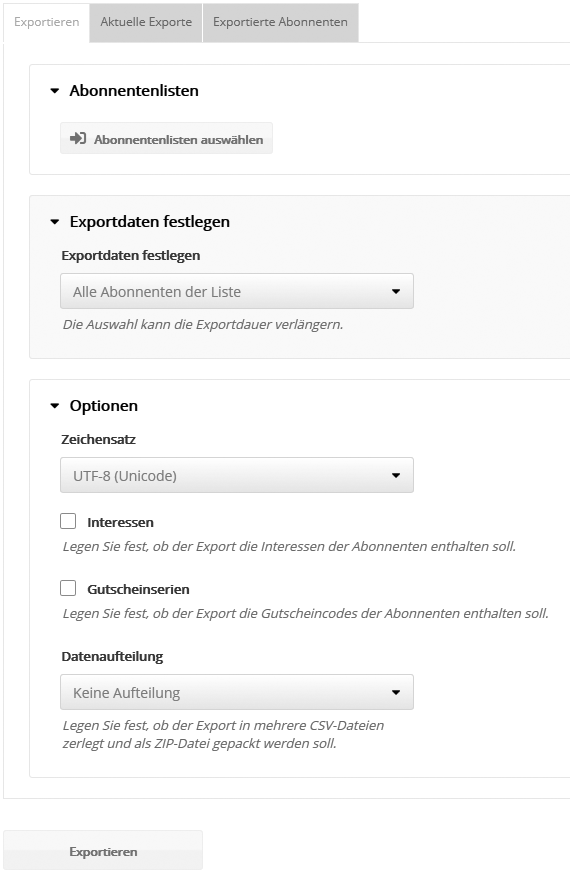
On the 'Export' tab, select one or more subscriber lists you want to export.


If you do not want to export all subscribers, you can 'Restrict the selection for the export' to:

  • Target groups
  • Opt-ins (period)
  • Opt-outs (period)
  • Profile changes (period)


In the 'Options' section, select the character encoding you want. The default setting is UTF-8. The field separator and text separator of the exported file cannot be configured directly in the subscriber export. You will find these settings under Custom settings.

You also specify whether interests and (if enabled) voucher codes are exported as well.

The 'Data splitting' option lets you export large subscriber lists in several parts of 60,000 subscribers each, to get around the row limit of older versions of Microsoft Excel. This creates several files, packed in ZIP format.

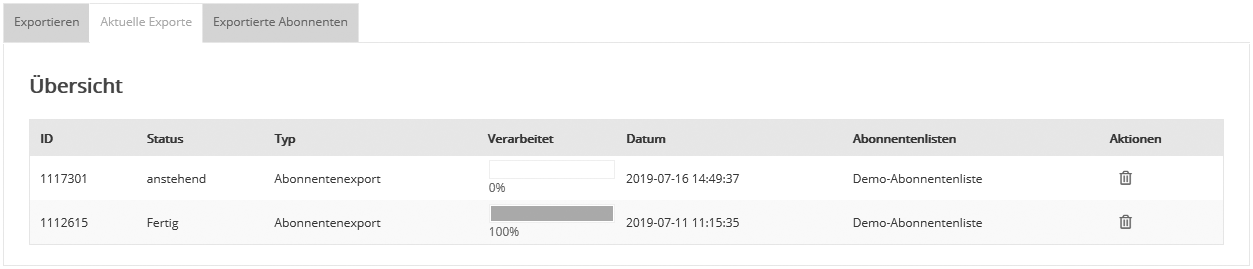
When you click the 'Export' button, emma starts the export and switches to 'Current export jobs'. Here you can see the progress of the current export. The progress bar and the status shown tell you when the export has been completed successfully. On the 'Exported subscribers' tab you will find the export file, which you can save to your computer by clicking 'Download'.

The 'Exported subscribers' tab shows a detailed view of the exported records. To download the export file, click 'Download'.