de en


Email: Activity export

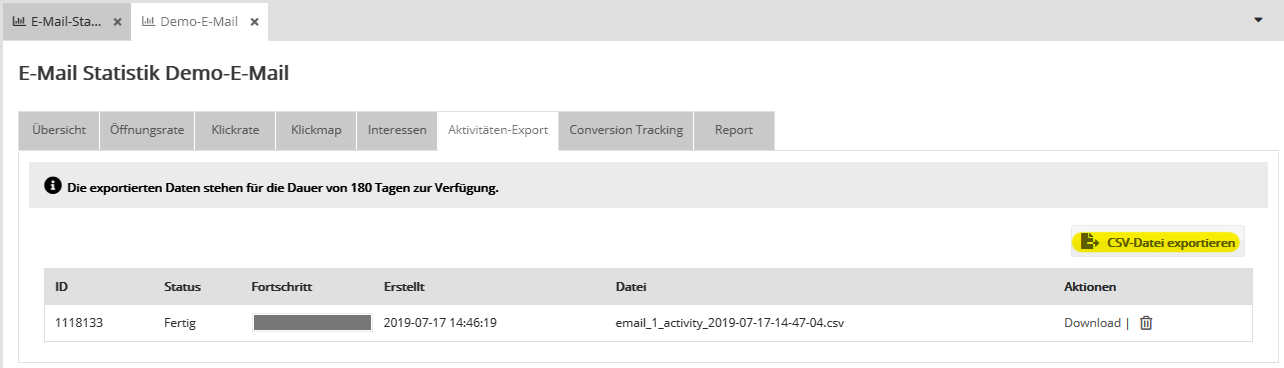
If your account has the permission for subscriber profiling, you can export the subscriber-related statistics of the opens and clicks of a mailing on the 'Activity export' tab.

Start the export by clicking 'Export to CSV file'. The export contains the opens and clicks of subscribers who have given profiling consent.

'Include non-openers as well' option: If you activate this option in the popup that opens, all subscribers to whom the mailing was delivered successfully are exported. This additionally includes:

  • Non-openers
  • Openers and clickers without profiling consent, whose reactions are counted in the totals but without reference to the subscriber
Note: For the latter reason, the CSV file of the activity export usually contains fewer opens and clicks than the email statistics show in total.

Activity export

Creating the export file can take a few minutes. When it is finished, a 'Download' link appears in the 'Actions' column.

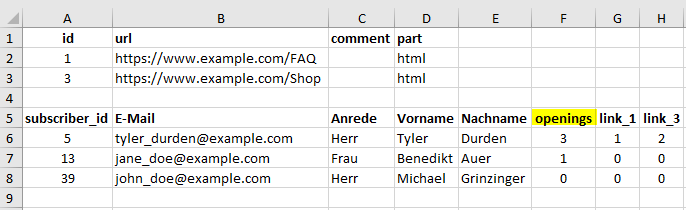
The CSV file consists of two sections:

  • The upper table contains a legend that shows exactly which URL each link ID listed in the lower section belongs to.
  • Below it, you will find a list of all exported subscribers. This list contains all subscriber data as well as details on the opens of your mailing ('openings') and the clicks on the links listed in the legend ('link_1', 'link_2', 'link_3', ...).


If you no longer need an exported file, you can delete it manually by clicking the trash icon. If you do not, the system deletes it automatically after 180 days.